会话页面
会话页面即应用程序中的聊天页面。Global IM UIKit 提供基于 UIKit UIViewController 类实现的会话页面类 RCChatViewController,由导航栏、消息列表和输入区三部分组成。
会话界面
会话页面以消息对象为元素,展示所有消息对象,也是所有消息的发起入口。Global IM UIKit 中常用的消息类型有:文本、图片、视频、文件、语音、贴纸等,支持回复、转发、复制等常用快捷交互。
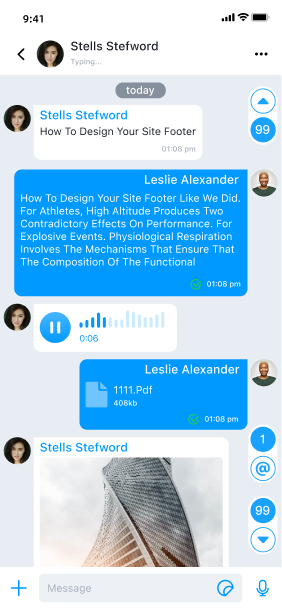
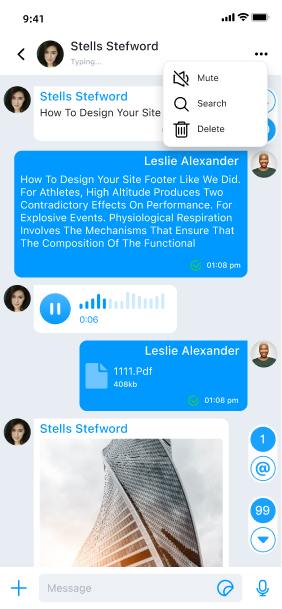
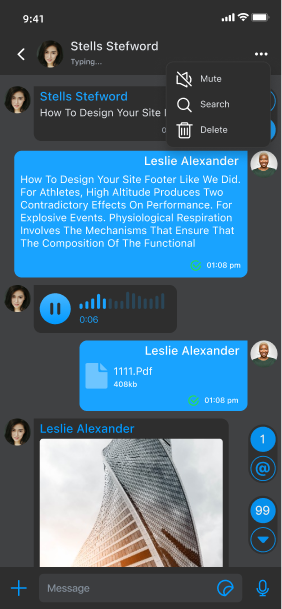
导航栏
Global IM UIKit 的 RCChatViewController 使用了系统的导航栏,RCChatHeaderView 继承于 RCBaseHeaderView,用于配置导航条属性。RCChatHeaderView 默认提供以下属性:
backItem对应的左侧按钮会显示会话名称和头像,点击会退出当前页面。支持提示连接状态和输入状态变化提示。moreItem对应的右侧按钮,点击会弹出更多操作菜单。默认支持免打扰、删除消息。
消息列表
Global IM UIKit 的 RCMessageListView 中的消息列表按时间顺序显示所有消息,并根据 RCChatViewConfig 定位到第一条未读消息、最新消息或指定的历史消息。
消息列表的视图基于 UITableView 实现,文本、图片、视频等不同消息类型通过继承 RCMessageCell 实现不同的视图展示。例如,RCTextMessageCell、RCFileMessageCell、RCImageMessageCell 继承自 RCMessageCell,用于展示会话中 RCTextMessage、RCFileMessage、RCImageMessage 等消息。如果自定义消息 Cell,必须根据消息类型注册消息 Cell。
初始化
基于 Global IM UIKit 开发时,推荐继承
RCChatViewController类,创建自定义的会话页面。在排查或复现与会话页面相关的问题时,可以直接使用RCChatViewController类。
RCChatViewController 提供了两个初始化方法:
/// 初始化方法
/// - Parameter chatModel: 会话
- (instancetype)initWithChatModel:(RCChatModel *)chatModel;

/// 初始化方法
/// - Parameter conversationIdentifier: 会话标识
- (instancetype)initWithConversationIdentifier:(RCConversationIdentifier *)conversationIdentifier;
默认从会话列表跳转进会话页面时,调用 initWithChatModel: 方法构建会话页面;如果是从通讯录等其他页面跳转进会话页面,可以调用 initWithConversationIdentifier: 方法构建会话页面。
创建一个继承会话页面的类 TestChatViewController : RCChatViewController
if (self.navigationController) {
    TestChatViewController *controller = [[TestChatViewController alloc] initWithChatModel:chatModel];
    [self.navigationController pushViewController:controller animated:YES];
} else {
    // 如果外部没有用 UINavigationController,需要创建一个
    TestChatViewController *controller = [[TestChatViewController alloc] initWithChatModel:chatModel];
    UINavigationController *navigationController = [[UINavigationController alloc] initWithRootViewController:controller];
    navigationController.modalPresentationStyle = UIModalPresentationOverFullScreen;
    navigationController.modalTransitionStyle = UIModalTransitionStyleCoverVertical;
    [self presentViewController:navigationController animated:YES completion:nil];
}
会话页面必须有导航控制器,如果没有控制器,请参考代码示例创建一个。
会话页面 View Controller
在 RCChatViewController 类中,会话页面主要由三个部分组成:
| 属性名称 | 类型 | 描述 |
|---|---|---|
headerView | RCChatHeaderView | UI 组件,聊天视图的导航头部,基于系统导航实现。 |
listView | RCMessageListView | UI 组件,显示消息的列表视图。 |
inputBar | RCInputBar | UI 组件,用于输入消息的输入面板。 |
viewModel | RCChatViewModel | 与此 ViewController 关联的 ViewModel。 |
config | RCChatViewConfig | 会话页面聊天视图的配置类。会话页面中部分样式与行为受 Global IM UIKit 全局配置影响。如需了解全局配置,参见 [UIKit 配置指南]。 |
视图结构如下:
定制导航栏
Global IM UIKit 的 RCChatViewController 使用了系统的导航栏,RCChatHeaderView 继承于 RCBaseHeaderView,用于配置导航条属性。
修改导航栏按钮
RCChatHeaderView 有两个默认属性:
/// 左侧按钮对应的 BarItem
@property (nonatomic, strong) RCBarItem *backItem;

/// 右侧按钮对应的 BarItem
@property (nonatomic, strong) RCBarItem *moreItem;
-
backItem对应的左侧按钮会显示会话名称和头像,点击会退出当前页面。支持提示连接状态和输入状态变化提示。 -
moreItem对应的右侧按钮,点击会弹出更多操作菜单:- 开启或关闭通知:设置当前会话通知提醒
- 搜索:SDK 抛出点击事件
didClickSearchBarItem,您可以重写方法自己处理 - 删除消息:清除当前会话的所有消息
会话页面和会话列表一样,支持修改按钮和标题。对于默认的两个按钮,您可以可以自定义。
在会话类里重写 willDisplayMoreMenu:forChatModel: 方法,自定义更多事件:
- (NSArray<RCChatMoreBarItem *> *)willDisplayMoreMenu:(NSArray<RCChatMoreBarItem *> *)items
                                            forChatModel:(RCChatModel *)chatModel {
    NSArray *items = [super willDisplayMoreMenu:items forChatModel:chatModel];
    // Custom items
    return items;
}
关闭导航栏状态显示
导航栏条状态显示默认开启,先可以显示链接状态、输入状态。您可以可以在全局配置中,关闭发送和连接状态显示
/// 是否显示网络状态,默认 YES
[RCIMKitConfig shared].displayNetStatus = NO;
/// 是否显示发送状态,默认 YES
[RCIMKitConfig shared].displaySendStatus = NO;
定制消息列表
Global IM UIKit 的 RCMessageListView 的消息列表按时间顺序显示所有消息。消息列表的视图基于 UITableView 实现,不同消息类型通过继承 RCMessageCell 实现不同的视图展示,根据消息类型注册对应的 RCMessageCell。
例如:RCTextMessageCell、RCFileMessageCell、RCImageMessageCell 等继承自 RCMessageCell 的类来显示会话中RCTextMessage、RCFileMessage、RCImageMessage 等消息。
消息列表数据源可以通过 ViewModel 的属性 messageModels 获取。
自定义消息 Cell
RCMessageListView 支持注册自定义消息展示 Cell,可以通过registerClass:forMessageClass: 方法注册自定义的消息展示模板。详细使用请看 消息展示样式
要了解与消息列表有关的事件,请转到 [页面事件监听]。
输入组件
RCInputBar 是 Global IM UIKit 的消息输入组件,用户可以在其中键入和发送消息,支持文本、文件、语音、图像、视频等消息类型。输入区域的视图是在 RCInputBar 中创建和控制的。
Global IM UIKit 已在 RCChatViewController 中提供了部分输入组件相关的事件回调。
其他定制化
修改默认跳转行为
进入会话页面支持三种跳转模式:
RCChatDisplayModeFirstUnreadMessage:定位到第一条未读消息RCChatDisplayModeLastUnreadMessage:定位到最新的消息(默认)RCChatDisplayModeHistoryMessage:定位到某一条历史消息
@property (nonatomic, assign) RCChatDisplayMode displayMode;
当 displayMode 被设置为 RCChatDisplayModeHistoryMessage 时,应用程序需要同时设置 RCChatViewConfig 的 locatedTime,传入要定位的消息的时间,Global IM UIKit 才能定位到指定消息,默认 locatedTime = 0。
@property (nonatomic, assign) long locatedTime;
修改撤回消息时间限制
RCChatViewConfig 中有两个属性用于配置消息撤回相关的限制。
recallDuration:控制消息发出后允许撤回的时间限制,默认 120 秒。
详见删除消息。
配置消息展示样式
会话页面 model 是 RCMessageModel, RCMessageModel 以下属性可以配置消息 cell 的展示样式:
更多特性
您可以在以下文档中继续了解如何自定义会话页面: